
Secrets for Remote Workshop Success [4 Tips for Facilitators]
Though remote work has it's perks, there are certainly a few downfalls— especially when it comes to maintaining efficient, clear communication with colleagues. What could've been a 5 minute chat in the office ends up as a winding Slack thread, your quick meeting turns into a long back-and-forth conference call... it's hard to keep track of what's said, where.
Design Sprints and workshops like the Marketing Alignment Workshop can help! Use them to gather everyone in one place with a clear schedule and itinerary with pre-decided methods for decision-making to get everyone on the same page, efficiently.
Workshop Activities
- Individual Ideation
- Idea Sharing
- Voting
- Discussion
The 4 basic activities in a workshop or design sprint are ideation, idea sharing, voting, and discussion. So, we split up these tips based on each step in the remote workshop process.
Before you run your remote workshop, you'll need to make sure you're prepared, so check out our article about best practices Design Sprint/Workshop Preparation here!
To start, we'll assume you have a video call open with your participants, as well as an interactive digital whiteboard for people to create sticky notes, share, categorize ideas, and vote.
1. Ideation: Keep Everyone Focused During Individual Work
Provide (quiet) Encouragement

Often during ideation exercises, workshop participants get held up wondering if the ideas they come up with are "correct". One big advantage to the online whiteboard you will use during your remote workshop is that you can see what participants are writing in real time. When getting started with ideation exercises, it helps to make a few encouraging comments about the sticky notes showing up on the board to let participants know they are on the right track. It's important to reinforce participants' confidence, so they feel comfortable sharing their ideas freely.
However, besides a few comments for encouragement, it's best to keep quiet and not share too many opinions during individual work, so participants can focus.
Concentrate Until the Clock Runs Out
Each activity in your workshop should be time-boxed. Most digital whiteboards have features where you can set at timer on everyone's board.
It's common for participants to think they've exhausted every idea possible, and stop working before time is up. During an in-person workshop, participants will usually keep writing just because they can see the people around them are— unfortunately this doesn't hold up through a computer screen.
Some of the best ideas come from pushing yourself when you're sure you've thought of everything already, so make sure to encourage participants to keep writing and push out as many ideas as possible until the very end of the time block you've set!
2. Sharing: Stay Organized
Grouping by the Facilitator Only
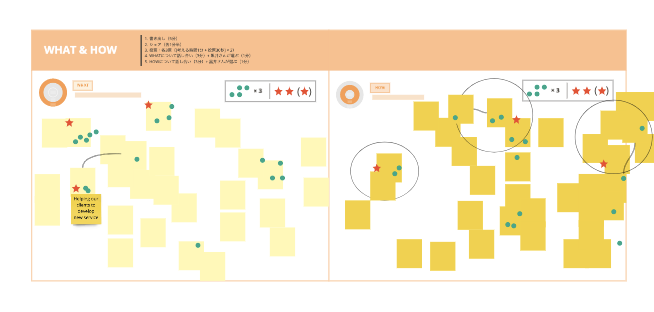
▲ Grouping similar sticky notes on miro
After everyone's written their ideas out on sticky notes, it's time to share. Before the next step (voting), similar sticky notes should be grouped together. This way, votes for similar ideas don't get diluted, and the board/canvas/table itself doesn't get too overloaded.
During in-person sprints and workshops participants can do the grouping themselves as they share or afterwards. For remote sprints however, it's best to only have the facilitator or facilitator's assistant grouping sticky notes. This way you can avoid having several people trying to move the same sticky notes, or accidentally placing them in the wrong place. Digital whiteboards can be tricky, so it's best that facilitators, who are the most comfortable using them, handle this step.
After all the sticky notes are grouped by idea, ask participants if they're comfortable with the grouping or think any sticky notes need to be moved around and adjust accordingly.
3. Voting: Pick Your Voting Method
Built-in vs. Custom Voting Methods

After sharing ideas, it's time for a voting session! This can sometimes be followed by a final vote from a pre-determined decision maker. During in-person workshops, you can use sticker dot voting to create a heat map, showing where stickers are concentrated throughout the sticky notes that are posted on our canvas/board/table. So how can do we vote remotely?
Well, the two most common digital whiteboards for workshopping, miro and MURAL, both have excellent voting functions, and you can use them as they are. However, you can also manually create a small circle that imitates a sticker and copy and paste it to imitate in-person dot voting. Let's go over the advantages and disadvantages of each.
■ Digital Whiteboard Built-In Voting Feature
Pros
- Votes can be completely anonymous
- Guarantee that each person casts the correct number of votes
- Voting results are automatically displayed
Cons
- Just by looking at the digital whiteboard overall, you won't know which sticky note received the most votes. You will have to open a results window separately.
- It's possible to accidentally vote for the wrong sticky note and lose track of where your vote went.
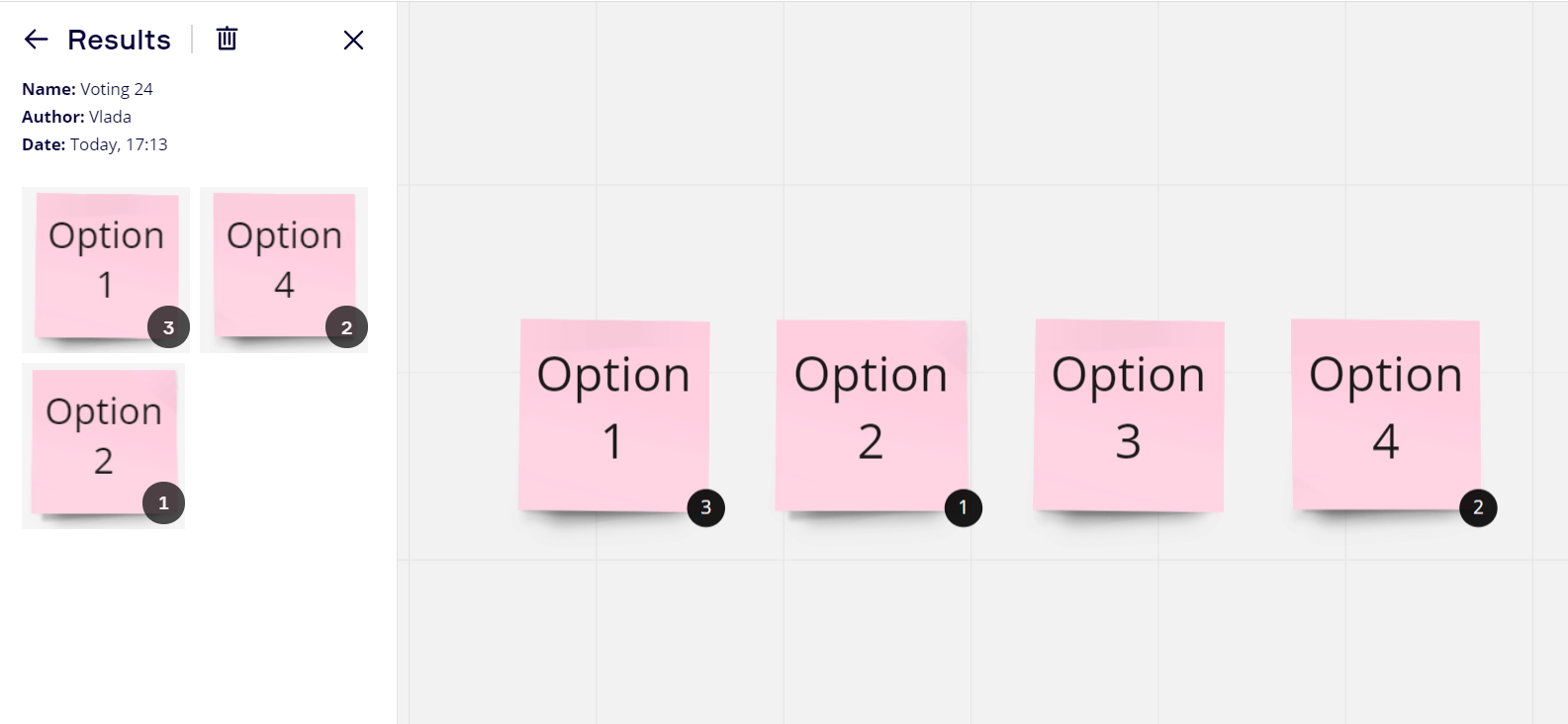
▲ The voting result using the voting function of miro. You can only check it when you open the voting results page. (Source: miro voting support page)
■ Voting Manually by Creating a Sticker
Pros
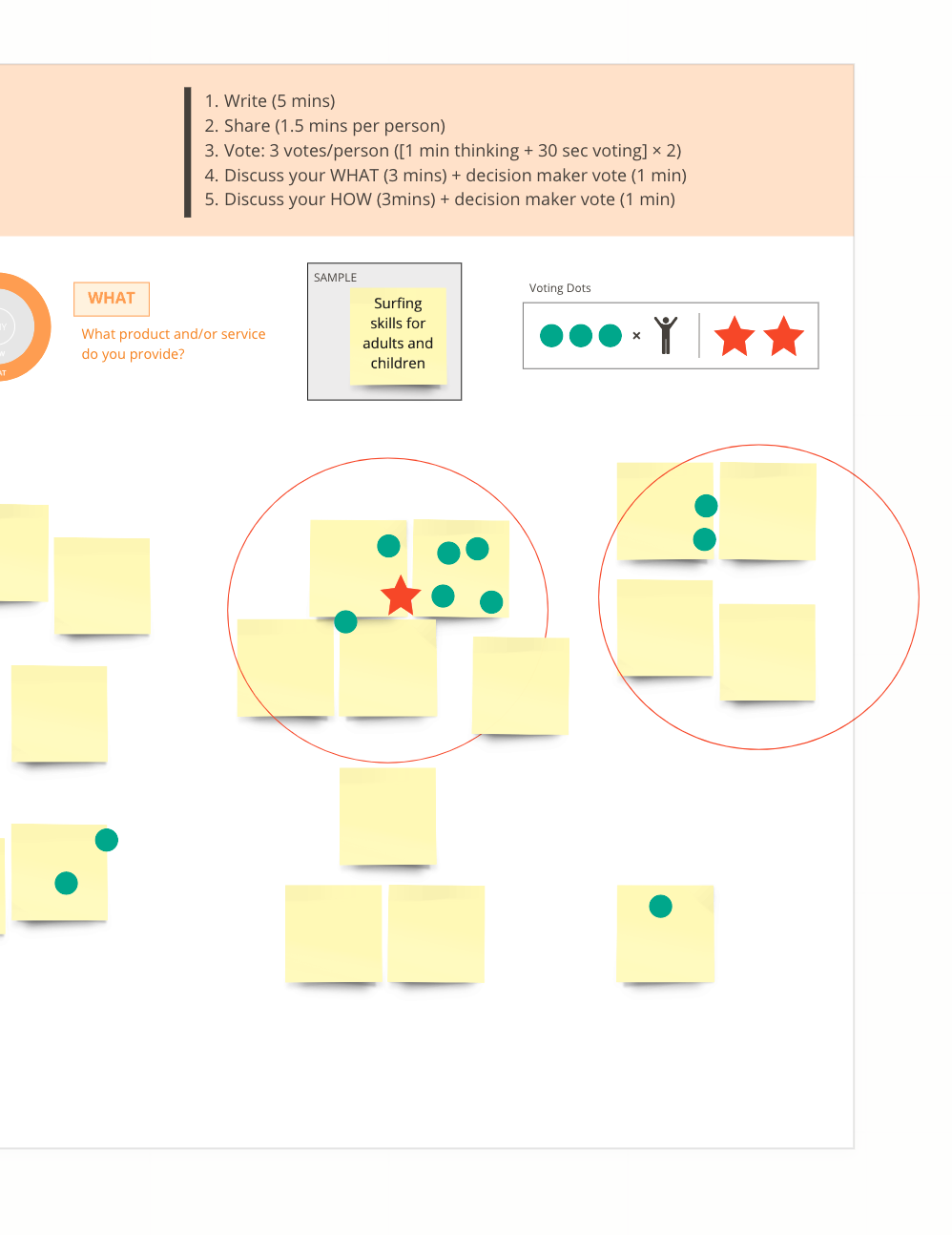
- You can see the voting result at a glance at any time without displaying the voting result page
- If your sticky notes are grouped, you can see which grouping is getting the most votes, instead of pinpointing vote to individual sticky notes.
Cons
- The stickers you create may get stretched and not look as uniform
- If you drag your the sticker instead of copy and pasting, it might get stuck behind a sticky note
- You will have to count votes by hand
▲ This is what it looks like when you've voted using handmade stickers. You can immediately check where the votes are gathered.
There are advantages and disadvantages to each voting method, so try each and choose the one that is easiest for you. At Neuromagic, we like to create voting dots for copy and paste. Even though it can be a bit more troublesome that the provided voting features from miro and Mural, we find that it's worth it to create stickers so that we can understand results at a glance later.
4. Discussion: Don't Hesitate!
Set Time Aside for Discussion
I'm sure many have already experienced this in online meetings— people tend to refrain from speaking out. Participants are never sure of their turn to speak and worry about interrupting each other, making it difficult to start an energetic, open discussion flow.
In face-to-face workshops we give a decent amount of time for open discussion and encourage participants to speak freely, but for remote workshops it's better to divide the discussion time out clearly. For example, set the first half of the discussion for listening to individual opinions one by one, and then set a second half for digging deeper into important topics that came up. Even this small bit of planning can make the discussion more productive.
Call on Participants
"When should I speak?" "It seems like he was about to say something..."— it's difficult to know when to jump into conversations when you're on a conference call. Because of this, the facilitator really needs to step up and encourage people to speak, or call on individuals and ask them to share. Of course, participants should also speak freely and voluntarily, but since time is limited, facilitators shouldn't hesitate to nominate people to speak if conversation isn't flowing.
Though you might worry that participants won't like being called on, as a workshop facilitator it's your job to use a bit of force to keep things moving. Don't be shy, and do your best to get people talking.
Wrap-Up
- Ideation : Try and gently point in the right direction, and make sure everyone is working until the timer goes off.
- Idea Sharing : Have everyone read aloud, with the facilitator handing grouping.
- Voting : Use either the online whiteboard voting function or the manual voting method, whichever is easier to use.
- Discussion : The discussion time should be subdivided as needed, and the open discussion time should be kept short. Try calling on participants directly if conversation is not flowing naturally.
These tips should help, but the best way to become a good facilitator is to practice! So get out there and give remote workshops and sprints a try, keep your cool and your confidence, and bring out the best in your participants!